OFFICIAL Written by GPN · Nov 12, 2026, 6:15 PM ET · Xbox · Gaming
Xbox has started rolling out new personalization options for Xbox Insiders, covering the console Home screen, the games library and the Guide.
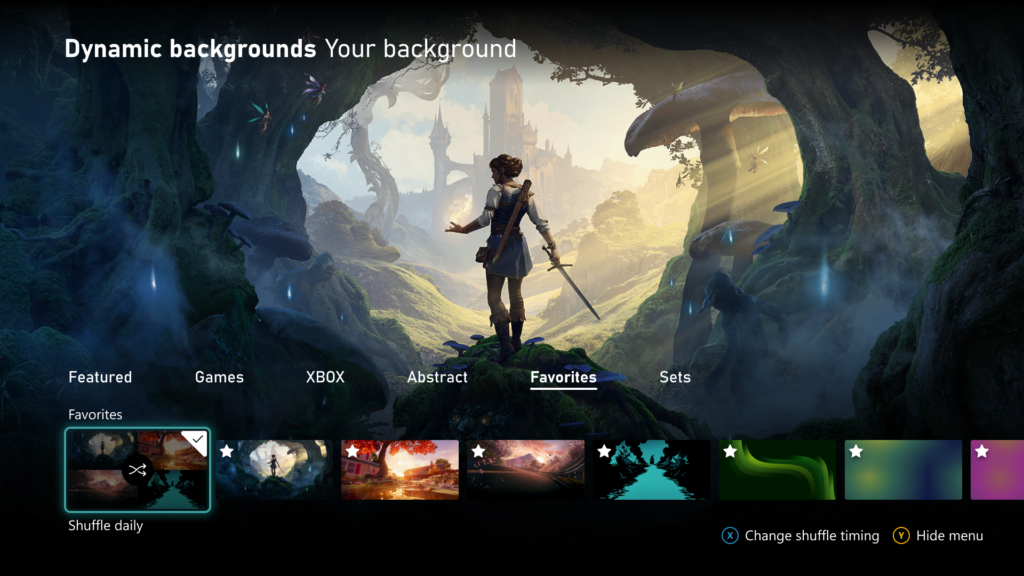
The headline change is rotating Home backgrounds. Insiders can now save their favourite dynamic backgrounds and shuffle through them automatically, with the background changing each time they sign in, or on an hourly, daily or weekly schedule. To save one, go to Settings > General > Personalization > My background > Dynamic backgrounds, pick a background and press X to add it to the new Favorites category. Saving a controller-exclusive background, such as the one from the Xbox Wireless Controller X25 Special Edition, lets you keep using it even when that controller is not connected.
Disc-based games get tidier, too. Since August, Xbox players have been able to claim digital licenses for their disc-based games, and those games now appear in a separate category in the full library. Players who prefer them mixed in with the rest of their owned games can switch back in Settings > General > Personalization > Games & apps, where the digital license icon on game tiles can also be hidden.
The Guide can now open on either side of the screen. Insiders can pick left or right in Settings > General > Personalization > Guide.
The new options are available to Alpha Skip-Ahead members first, and will reach more Insiders and players over time. Xbox is asking Insiders to share feedback through its player voice page and the Xbox Insider subreddit.
 DJ Khaled Becomes 'Dr. Xbox' and Prescribes a Day Off for GamingXbox · Gaming
 Project Helix Is a Console That Plays Your PC Games, Not a PC, Xbox SaysXbox · Gaming
 Xbox Brings Back the Original Xbox and Xbox 360 Boot-Up Animations for Its 25th AnniversaryXbox · GamingXbox Marks 25 Years With a Digital Anniversary Magazine You Can Read NowXbox · Gaming