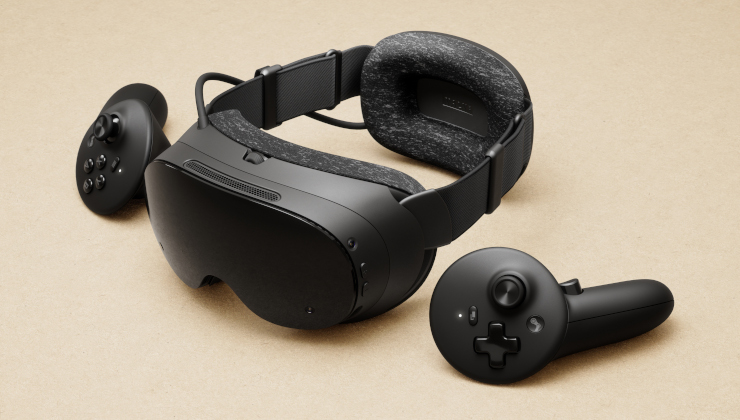
Valve has released SteamOS 0.5.10 Beta for Steam Frame, a new beta update for its SteamOS Linux VR headset that pushes image quality further, with a new display sharpness control, better streaming decode and a round of fixes for the headset and its controllers.
Image Quality Improvements
The headline changes are visual. Streaming decode performance has improved, allowing for higher default streaming resolutions, and a new global display sharpness control has been added, defaulting to on, which users can tune to personal preference under VR Settings, Display, then Display Sharpness. Valve also reduced the green tint on high-frequency greyscale image content and reduced head wobble when streaming remote desktops.
The update also fixes display low-end gamma response, including inconsistencies between the eyes on some headsets, and improves eye tracking self-calibration. SGSR Sharpening — renamed from Foveated Sharpening in this release — now supports VR streaming through Steam Link, and foveated sharpening is now independent from eye tracking, where previously it would switch off when eye tracking was off and now defaults to centred. Overlay render quality is now always set to Low on Steam Frame, with the option hidden, fixing problems that happened when Ultra was selected.
General
The update fixes a hang on the Steam Frame logo at boot after updating the OS, and improves Multi-Link Streaming robustness under adverse network conditions. Eye-tracking latency is improved, particularly at lower framerates, and the Iris video decoder driver has been upgraded. A new user preference controls haptics strength per game, under VR Settings, Controllers, then Manage Controller Bindings. The display now dims for 30 seconds before sleep, and new accessibility settings add prism correction for diplopia, under Advanced Settings, General, then Accessibility, taking effect after a headset restart. A visual glitch when opening or closing the dashboard in some games is fixed, and Advanced Supersampling support has been removed on Steam Frame.
Developers
For developers, the update adds support for XR_KHR_convert_timespec_time to the Android runtime.
Camera Pass Through / Room View
PC streaming now supports chroma key to allow Room View to be shown on VR content. The feature requires also opting into the beta branch of SteamVR on PC, pairing the headset-side update with the SteamVR Beta 2.19.4 release that arrived the same day.
Background
SteamOS 0.5.10 follows the 0.5.9 beta from November 13 and continues a run of beta updates focused on image quality, text and UI readability for the Steam Frame. The headset runs SteamOS, Valve's Linux-based operating system, and the beta channel is where new features are tested before they reach the stable release.
How to get it
The update is available on the Steam Frame Beta channel, which users can opt into under Settings, System, then System Update Channel. As a beta release, the features are still being tested and will not install automatically for users on the stable channel. For Steam Frame owners, the practical gains are straightforward: a sharper picture out of the box, steadier streaming and a headset that behaves better at boot, at sleep and in the hand.